


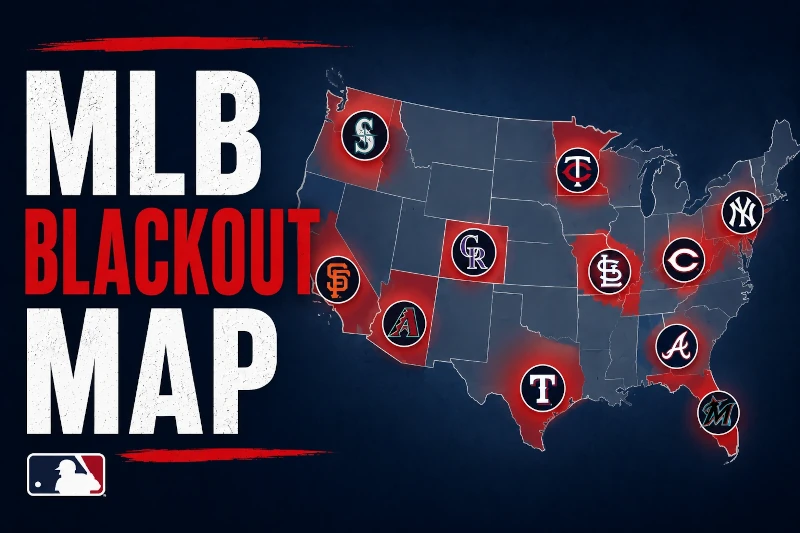
If MLB.TV says your game is blacked out, the reason usually comes down to where you are. Your ZIP code can decide which teams you're allowed to watch live, even when you already pay for MLB.TV. It's a common frustration because MLB blackout territories don't always follow state lines, city lines, or what most fans would consider "local." This guide explains how the MLB blackout map works, why some regions have multiple blackouts, and what you can actually do if your team is blocked.
MLB.TV uses your location to decide which games are restricted, but StreamLocator is a Smart DNS service that routes MLB.TV around blackout restrictions so the games you already pay for can play.
The MLB blackout map is built around broadcast territories. Each team has a defined local market where its games are protected for local TV partners.
If you live inside that market, MLB.TV blocks that team's live games. The app checks your location, decides whether you're inside a restricted territory, and shows a blackout message if the game is not available to you.
That's why MLB.TV can feel inconsistent:
The frustrating part is that MLB.TV already has the game. The problem isn't content. It's access.
The official alternative is usually to subscribe to the local sports channel that owns the rights in your area, or to a live TV bundle that includes it. That can mean $15–25/month for a local sports channel subscription, or $65–80/month for hundreds of channels most baseball fans will never watch.
That works, but it often means paying again to watch a team you expected to get through MLB.TV. StreamLocator takes a different route. It is a Smart DNS service built for streaming, so it helps MLB.TV work around blackout territory restrictions without using a VPN.
The easiest way to check your blackout zone is to use MLB.TV's official ZIP code checker. Enter your ZIP code and MLB.TV will show which teams are restricted in your area.
Blackout territories are not always obvious. You might live in one state but be assigned to a team from another, or live in a region where several teams overlap.
If your team is listed, your official options are limited: add the local sports channel, use a live TV bundle, or use a workaround that makes MLB.TV usable.
VPNs are the workaround many people try first. They can sometimes work by changing your visible location, but MLB.TV actively blocks known VPN IP ranges. VPNs can also slow live streams, and enforcement often tightens on game days.
Smart DNS is lighter. StreamLocator only reroutes the traffic needed for MLB.TV, which helps avoid the speed and reliability problems that make VPNs frustrating for live baseball.
MLB.TV's official blackout checker uses your ZIP code to show which teams are blacked out in your area. If your team appears in the results, you won't be able to watch that team live on MLB.TV without a workaround.
The MLB blackout map varies by region, and some areas are more complicated than others. The examples below are not a replacement for MLB.TV's ZIP code checker, but they show why blackout restrictions can feel so inconsistent.
The Northeast has some of the densest blackout overlap in MLB. Red Sox territory can cover much of New England, while Yankees and Mets territory overlaps around New York and nearby areas. Phillies territory can affect parts of Pennsylvania, New Jersey, Delaware, and nearby regions.
Depending on your ZIP code, you may see restrictions for more than one team. Officially, that usually means using channels like NESN, SNY, YES Network, or NBC Sports Philadelphia. For team-specific guides, see how to watch Red Sox without blackouts and how to watch Phillies without blackouts.
The Midwest has several overlapping markets across Illinois, Iowa, Wisconsin, Missouri, and Indiana. Cubs games may be blacked out around Chicago because of Marquee Sports Network. White Sox, Brewers, and Cardinals restrictions can also apply in nearby or overlapping areas.
This is why Iowa often comes up in MLB blackout complaints: some fans can be restricted from several teams at once, even when none feel truly local. For a team-specific breakdown, see how to watch Cubs without blackouts.
The Braves have one of MLB's largest blackout territories, covering much of the Southeast, including Georgia, Alabama, Tennessee, Mississippi, South Carolina, and parts of North Carolina. That means Braves fans across a wide region may be blocked from watching live Braves games on MLB.TV.
The official route is usually Bally Sports South, Bally Sports Southeast, or a live TV package that includes the right local sports channel. For many fans, that's a lot to add when they already pay for MLB.TV. For more detail, see how to watch Braves without blackouts.
On the West Coast, blackout territories can cover large parts of California, Nevada, Oregon, Washington, and nearby regions. Giants fans in Northern California and parts of Nevada may be blacked out because of NBC Sports Bay Area. A's territory can overlap in the Bay Area, while Dodgers restrictions affect much of Southern California and nearby areas.
The size of these territories is what catches many fans off guard. You don't have to live beside the stadium to be considered local by MLB.TV. For a team-specific guide, see how to watch Giants without blackouts.
The Mid-Atlantic can be especially confusing because Nationals, Orioles, and Phillies territories can overlap across parts of Washington, DC, Maryland, Virginia, Delaware, Pennsylvania, and New Jersey.
A fan in this region may be considered local for more than one team, which can create several MLB.TV blackouts from a single ZIP code. Officially, the solution is to subscribe to the correct local sports channel or live TV service. Practically, many fans don't want another expensive bundle just to watch the games they expected from MLB.TV.
Some regions have multiple blackouts because MLB broadcast territories overlap. A ZIP code can sit inside more than one team's protected market, especially in areas between major cities.
That's why a fan might open MLB.TV and find that two, three, or even more teams are restricted. The system is based on broadcast rights, not distance from the stadium or which team you support. MLB.TV checks your location against the blackout map and applies the restriction automatically.
The official answer is usually to find the local sports channel for each team or use a live TV bundle. But that can get expensive fast, especially if you only care about one team.
You can either pay for multiple subscriptions… or make MLB.TV work the way you expected.
Yes, blackouts can still apply even if the game is not easy to watch on local TV that night.
This is one of the most frustrating parts of the MLB blackout map. The restriction is based on the broadcast territory, not whether the local sports channel is convenient, affordable, or even available through your current provider.
So you may see an MLB.TV blackout even if:
The official answer is still to get access through the local rights holder. For many fans, that means a separate sports subscription or a $65–80/month live TV bundle.
That may be reliable, but it is often more than people want to pay just to follow one team. StreamLocator exists for the other route: keeping MLB.TV as the main product and making it work properly when blackouts get in the way.
StreamLocator is a Smart DNS service that routes MLB.TV around regional blackout restrictions, so you can keep using MLB.TV without adding a $65–80/month live TV bundle.
Being in a blackout zone doesn't mean you can't watch your team. It means MLB.TV is enforcing a geographic restriction based on where it thinks you are.
Your main options are:
VPNs are not bad tools. They're just usually the wrong tool for MLB.TV blackouts. They route all your traffic through remote servers, and those server IP ranges are exactly what streaming services are trained to detect.
StreamLocator is different because it is a Smart DNS service built specifically for streaming. It does not route all your internet traffic through a VPN tunnel. It helps MLB.TV see the right location for the game while keeping the rest of your connection lightweight.
You don't need another service. You just need MLB.TV to work properly.
For team-specific help, see how to watch Red Sox without blackouts, how to watch Cubs without blackouts, how to watch Phillies without blackouts, how to watch Braves without blackouts, how to watch Mets without blackouts, and how to watch Giants without blackouts.
The teams blacked out in your area depend on your ZIP code and MLB.TV's blackout territory rules. Some areas have one local team restriction, while others sit inside multiple team territories. The safest way to check is to use MLB.TV's ZIP code blackout checker before game time.
The MLB blackout map works by ZIP code, not by state or city alone. That means two fans in the same state can have different blackout restrictions depending on their exact location. If your ZIP code is inside a team's broadcast territory, that team's live games are blocked on MLB.TV.
The blackout map MLB uses is based on regional broadcast rights. Each team has a protected territory where MLB.TV must restrict live games. These territories can overlap, which is why some fans see multiple teams blacked out from one location.
MLB blackout zones work by matching your location to a team's local broadcast territory. If your location falls inside that territory, MLB.TV blocks the live stream and expects you to watch through the local sports channel instead. The restriction is contractual, not technical.
Yes, MLB.TV is mainly designed for out-of-market games. If you live outside a team's blackout territory, you can usually watch that team live on MLB.TV. If you live inside the territory, the game is blacked out unless you use another official subscription or a workaround like Smart DNS.
The MLB blackout map is confusing because it doesn't match how fans think about baseball. You might pay for MLB.TV, support one team, and still be blocked because your ZIP code falls inside a protected broadcast territory.
The official answer is usually to add a local sports channel or live TV bundle. That works, but it can mean paying for a full cable package to watch one team.
StreamLocator gives you a simpler path: a Smart DNS service built for streaming, designed to make MLB.TV work around blackout restrictions for a fraction of what a local sports channel subscription costs.
Not another streaming service. Just the one tool that makes MLB.TV work.
StreamLocator is a Smart DNS service that routes MLB.TV around blackout territory restrictions. If your team is blacked out in your area, StreamLocator lets you watch on MLB.TV, for a fraction of what a local sports channel subscription costs.
StreamLocator is a Smart DNS service that routes MLB.TV around blackout territory restrictions. If your team is blacked out in your area, StreamLocator lets you watch on MLB.TV, for a fraction of what a local sports channel subscription costs.


